01 · Plan
A forecast for how you fish
Wind, waves, pressure and tide for ten days, with the hours that suit how you fish marked above them.
Three steps
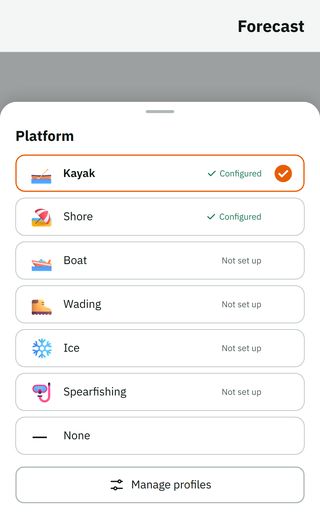
1. Pick how you fish: shore, boat, kayak, wading, ice or spearfishing.
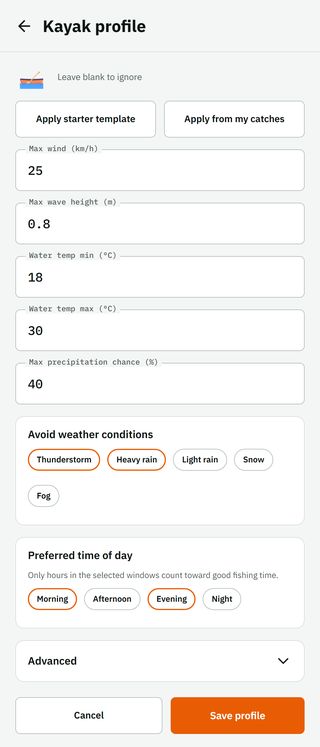
2. Set once what suits you: max wind, max wave height, a water-temperature range, chance of rain, weather you don't go out in (thunderstorm, heavy rain) and the hours of the day you fish. Don't want to start from zero? There are ready-made values for each kind of fishing, or the app suggests them from your catches.
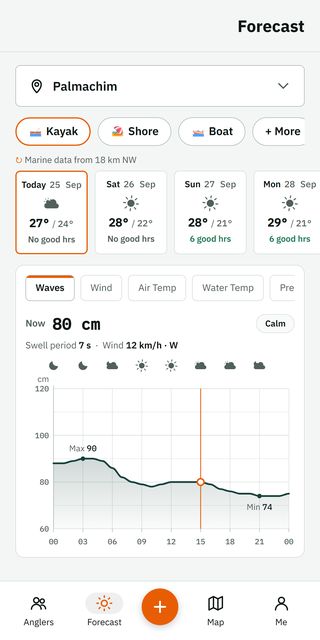
3. From then on the forecast does the work: each day says how many good hours it has, and the chart marks them. A good hour is one where everything you set holds.
What the chart shows
A thin line crosses the chart at the current hour, and the value right now is written above the chart. Drag your finger along the chart to read any other hour.
On the days ahead a summary of the day appears, and the chart marks the high and the low for waves and wind. Above the chart there is a weather icon every three hours.
Where the data comes from
The forecast comes from Open-Meteo: the weather, and beside it the sea: waves, swell, sea temperature and tide. Tide is computed from sea-level height, so near the coast it is good for the trend and the peak times, not for navigation.
The forecast runs ten days. Free shows three.
Under the row of fishing types a line says how far away, and in which direction, the sea data comes from.
Sun and moon
The Sun & moon tab shows each day's main window and the minor windows, by the moon. If you have set what suits you, only the windows that fall in your good hours remain.
Lakes, rivers and reservoirs
The app recognises fresh water by the kind of spot you saved, by the place name, or by the distance from the sea. On fresh water, waves, swell and tide are hidden and the forecast says it is for fresh water.
Questions
- How accurate is it?
- As good as the forecast model behind it. Wind, pressure and waves come from Open-Meteo; tide is computed from sea-level height, so near the coast it suits the trend and the peak times, not navigation.
- What do I need to see good hours?
- Pick how you fish and set once what suits you. Ready-made values apply in one tap and can be changed later.
- How many days ahead?
- Ten on Premium, three on Free.
Get on the water.
Installing is free. Your data stays yours.